Automation often breaks at the handoff, not at the model. A ticket can reach the wrong queue, a lead can lose its owner, or a weekly report can include mismatched CRM fields.
This Relevance AI review looks at the platform through that operational lens. For SaaS teams, it can help turn repeatable work into agent-driven workflows, but only when the source data, access controls, approval points, and monitoring are defined before launch.
The strongest starting point is one bounded process with a clear owner and measurable output.
Relevance AI Review: Where It Fits in SaaS Operations
Relevance AI is an agent platform built around tools, workflows, and an “AI workforce” model. In practice, an agent can receive an input, pull context from connected systems, apply instructions, use approved tools, and return a result or request a decision.
Its integration catalog advertises connections across more than 2,000 services, including common SaaS systems such as Slack and Salesforce. That breadth matters only if the connections you need support the fields, triggers, and write actions your workflow requires.
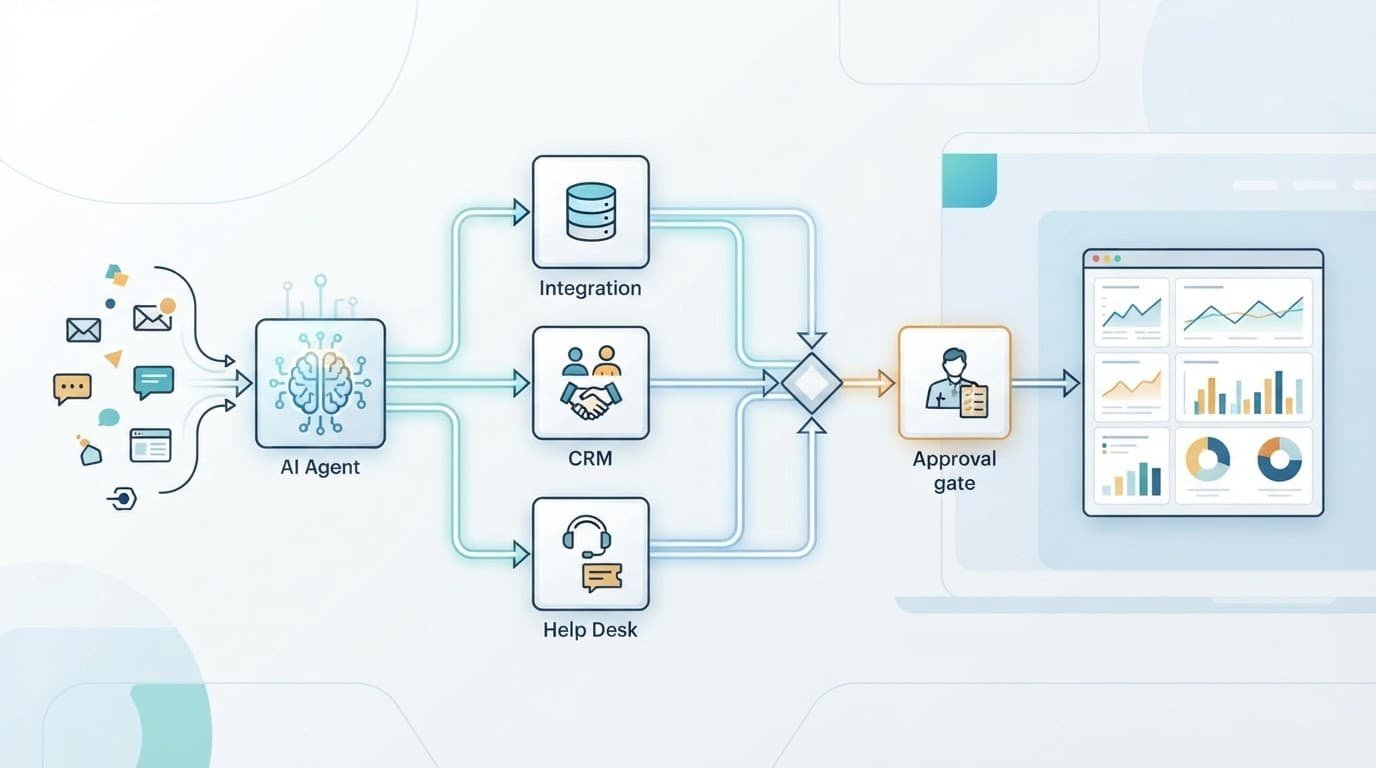
Agents work best with defined inputs and outputs
A useful agent job has a narrow brief. For example, “classify inbound support requests against the approved taxonomy and draft a routing recommendation” is far safer than “manage support operations.”
The agent needs required fields, trusted sources, and a clear output format. Those might include ticket text, customer plan, account owner, issue category, confidence score, and an escalation reason. Without that structure, results become harder to audit and harder for downstream systems to use.
Good candidates are repetitive and reversible
Relevance AI fits best when a workflow has enough volume to justify setup but remains easy to review. Good examples include ticket triage, account research, lead enrichment, call-note summaries, routing suggestions, and weekly metric commentary.
Avoid starting with actions that can’t be easily reversed. A workflow that drafts a customer reply is easier to pilot than one that changes billing status, deletes records, or sends mass outreach.
An approval gate should sit at the point of no return, not after the agent has already changed a customer-facing or financial record.
Start With Data, Access, and Process Ownership
An agent can’t correct a messy CRM or replace missing operating rules. Before connecting Relevance AI to production systems, document the process that humans follow today.
That document should state what begins the workflow, which record is the source of truth, which data is optional, and when a person takes over. It also prevents a common problem: two teams using different definitions for the same field.
Build a small data contract
For lead routing, define required fields such as company domain, lifecycle stage, country, employee range, and assigned segment. For support work, identify the taxonomy, service-level targets, escalation rules, and restricted categories.
Then test source quality. Look for duplicates, empty fields, stale account owners, and inconsistent picklist values. If your CRM has three spellings of the same market segment, the agent will inherit that ambiguity.
Keep a short list of fields the agent may read, write, or only suggest. That boundary makes troubleshooting far less painful later.
Use least-privilege access from the first test
Create separate service accounts for each production connection. Give the agent read access before giving it write access, and restrict it to the objects and fields required for the pilot.
Relevance AI supports API-based triggering, and its API deployment page describes triggering agents through an API. That can suit workflows launched from a webhook, internal tool, or automation platform. However, the calling system still needs authentication, error handling, and a record of every request.
Don’t pass unrestricted customer data into a test environment. Review vendor agreements, retention needs, data residency requirements, and internal privacy policies before sending sensitive fields to any AI service.
Practical Workflows for SaaS Teams
The platform has enough flexibility for many operational jobs. A sensible rollout focuses on jobs where output quality is visible and a human can correct mistakes quickly.
Support triage and knowledge-assisted drafts
A support agent can read a new ticket, detect intent, extract product area, identify urgency signals, and propose the right queue. It can also retrieve approved knowledge and draft a reply for an agent to edit.
Keep the help desk as the final record. Start by letting the agent add internal notes or proposed tags, rather than automatically changing priority or sending messages.
Measure agreement with human triage, time to first assignment, escalation accuracy, and the percentage of recommendations accepted without edits. A fast answer that misroutes enterprise customers isn’t an operational win.
Enrichment, reporting, and lead routing
For enrichment, use the agent to identify missing fields, normalize unstructured information, or prepare research summaries. Never allow an enrichment run to overwrite a verified CRM value solely because a model found a different answer.
Lead routing works when deterministic rules remain in charge. An agent can flag exceptions, summarize account context, or recommend routing when key fields conflict. Your CRM should still enforce territory, ownership, and round-robin rules.
Reporting is another practical use case. An agent can turn approved dashboard data into a weekly narrative, identify incomplete inputs, and draft questions for metric owners. It shouldn’t become the source of truth for revenue, retention, or finance reporting.
Put Human Approval and Monitoring Into the Workflow
Agent reliability comes from operating controls, not impressive prompts. Relevance AI documents human approvals and escalations, including configurable points where agents request permission before an action.
Design approvals around risk
Use automatic completion only for low-risk tasks, such as categorizing an internal request or creating a draft. Require review before sending customer communications, creating external records, updating CRM ownership, or calling systems with financial or security consequences.
The platform’s approvals and escalations documentation describes how agents can seek approval before taking actions. Make the reviewer responsible for a defined decision, not a vague final check.
For example, a support lead can approve an escalation recommendation, while a RevOps manager approves a change to a lead-routing rule. Every approval should have an owner and a service-level expectation.
Monitor runs, exceptions, and drift
Review execution logs after every early deployment. Capture the original input, tools called, output, model version, approval decision, final system action, and error status.
Relevance AI’s product materials describe run history, execution logs, and monitoring capabilities. Its changelog is also worth watching because agent controls and integrations can change after your initial build.
Create an exception queue for low-confidence outputs, failed tool calls, missing data, and rules that conflict. Review a sample of completed runs as well. If you inspect only failures, you’ll miss recurring errors that appear plausible.
Pricing and Capacity Need a Volume Test
As of August 2026, Relevance AI’s official pricing documentation lists Free, Pro, Team, and Enterprise plans. The public entry prices are useful for a pilot, but operational cost depends on how often agents run and which models or tools they use.
| Plan | Published starting price |
|---|---|
| Free | $0 per month |
| Pro | $19 per month on annual billing, or $29 monthly |
| Team | $234 per month on annual billing, or $349 monthly |
| Enterprise | Custom pricing |
The current pricing documentation separates plan features and usage allowances. Relevance AI also uses two meters: Actions for tool execution and Vendor Credits for AI model costs.
Its pricing change documentation lists published unit prices of $80 per 1,000 Actions and $20 per 10,000 Vendor Credits. Usage, concurrency, and included quotas can vary by plan, so confirm the current plan matrix before committing.
A useful Relevance AI review should compare projected cost against real workflow volume. Test a typical week, a busy week, and a backfill job. Account for retries, failed integrations, approval delays, and model calls, not only the happy path.
Run a Controlled Pilot Before Expanding
A pilot should prove that the workflow is accurate enough, safe enough, and easy enough to operate. Pick one team and one process owner. Avoid connecting five departments at once.
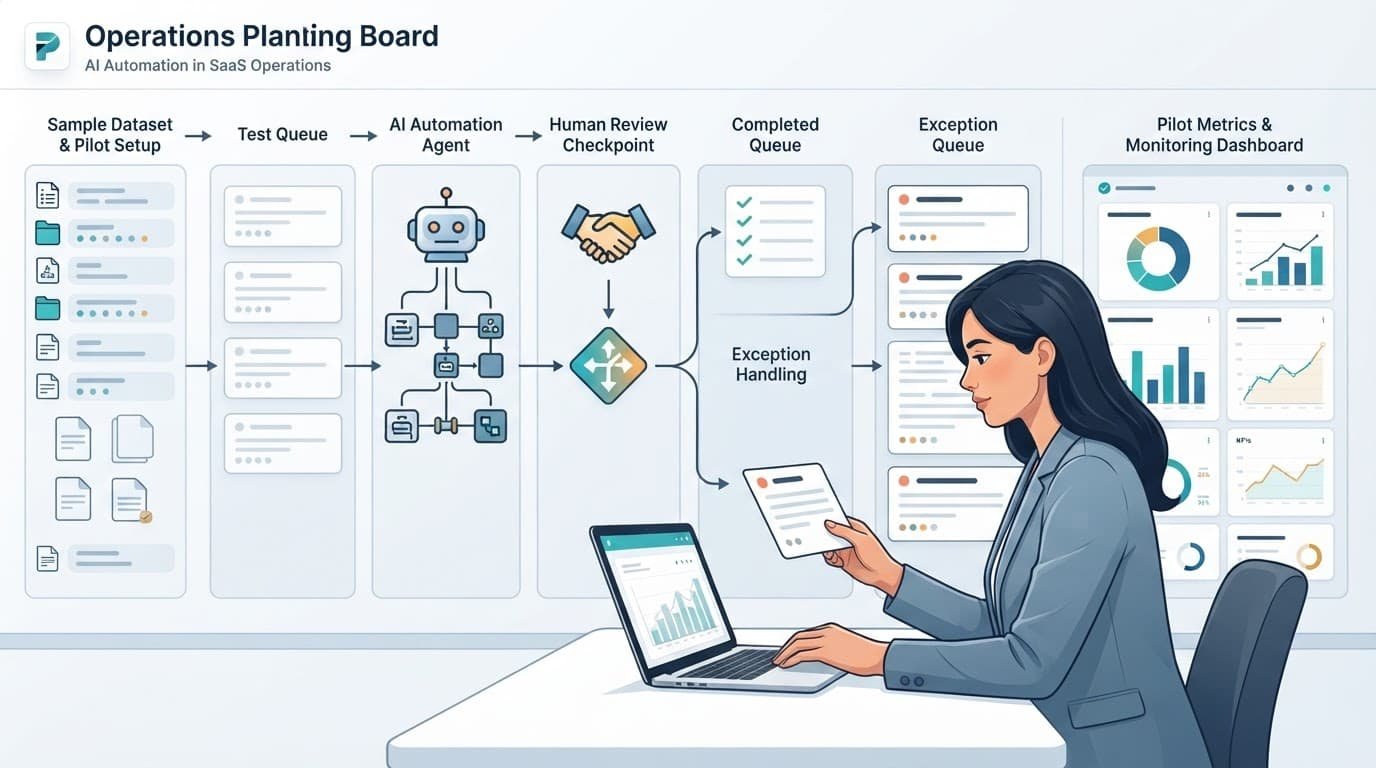
- Choose one repeatable task, such as support-ticket classification or lead-routing exception review, and document the current manual process.
- Build a labeled test set of 50 to 100 historical records. Include edge cases, incomplete records, and examples that previously required manager judgment.
- Configure the agent to produce a recommendation only. Keep production write access disabled until reviewers trust the output.
- Send results to a staging queue with a named approver. Track acceptance, edits, rejections, tool errors, and time spent reviewing.
- Compare the agent’s output with the human baseline. Look at accuracy by segment, not only the average result.
- Expand permissions only after the workflow meets the team’s agreed threshold for quality and review effort.
A pilot can also expose hidden process problems. If reviewers disagree on the correct ticket category, fix the taxonomy before revising the prompt.
Limits and Failure Modes to Plan For
Relevance AI won’t fix conflicting source data, unclear ownership, or an undocumented process. It can make those weaknesses show up faster.
Common problems show up at the edges
Integrations can fail because a field changes, a token expires, or an API rate limit is reached. A model can also produce a confident recommendation when account context is incomplete.
Prompt changes may improve one segment and worsen another. In addition, a tool call that works in a test workspace may fail under production permissions. Keep version history, test changes against a fixed sample, and prepare a manual fallback.
Treat agents as operational systems
Every agent needs an owner who reviews failures, approves changes, and decides when to pause it. That ownership matters more than the number of automations in the workspace.
For small teams, the biggest risk is often overbuilding. One monitored workflow with a clear result is more useful than a large collection of agents nobody audits.
Final Evaluation Checklist
Use this Relevance AI review as a decision framework, not a promise of autonomous operations. The platform is a fit when it supports a well-defined job, works with your systems, and leaves clear control points for people.
Before moving beyond a pilot, confirm the following:
- The workflow has stable inputs, a trusted source of truth, and a named business owner.
- Connected systems provide the exact read and write access the process needs.
- Sensitive or irreversible actions require human approval.
- Your team can review logs, handle exceptions, and pause the workflow quickly.
- Projected Actions, Vendor Credits, and concurrency match real operating volume.
A disciplined pilot will show whether Relevance AI reduces manual handling without weakening data quality or accountability.
