A failed charge can turn a satisfied subscriber into involuntary churn before they make any decision to leave. A reliable failed payment recovery workflow gives customers a clear path to pay while preventing chaotic retries, surprise lockouts, and support tickets with no owner.
Treat recovery as a product and operations process, not a few automated emails. Your billing provider handles payment attempts, but your team must define customer access, communication, escalation, and cancellation rules.
Assign ownership before you automate
One person should own the workflow, even if several teams touch it. For a small SaaS company, that might be the founder or operations lead. As the company grows, RevOps, finance, support, and engineering often share the work.
Track involuntary churn separately
A cancellation is a customer decision. A declined renewal is often a payment-method issue, an authentication problem, or a temporary lack of funds. Those cases need different messages and different product behavior.
Your reporting should separate:
- Voluntary cancellations initiated by the customer.
- Involuntary churn after an unrecovered failed renewal.
- Recovered invoices that briefly entered a grace period.
- Disputes, which belong in a separate financial and support process.
Chargebee’s guide to failed payments and involuntary churn is a useful reminder that recovery is more than a retry schedule. Ownership, messaging, and access rules all affect the customer experience.
Keep billing and entitlement states separate
A subscription can be unpaid while a customer still has temporary access. It can also be canceled while an invoice remains open. Avoid using one status field to run your whole system.
Maintain at least two records:
- A billing status for the invoice or payment attempt.
- An entitlement status that controls what the customer can do in your app.
That separation prevents a single delayed payment event from locking an active customer out of critical work.
Build a failed payment recovery workflow around states
A state machine makes the workflow understandable, testable, and easier to automate. Store state transitions in your database rather than inferring them from email history or provider dashboards.
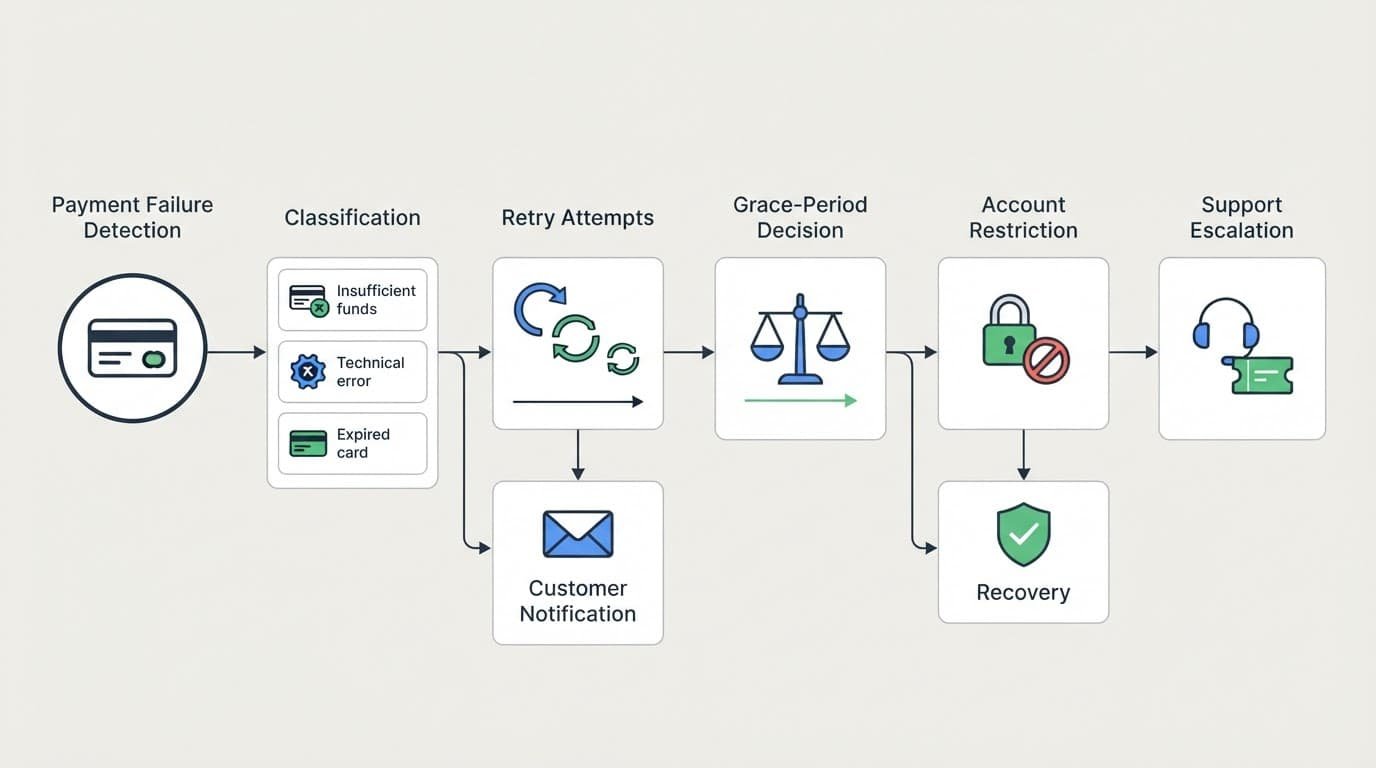
Use the provider’s latest invoice or payment object as the financial source of truth. Then map it into the states your product understands.
| State | Trigger and condition | Action | Exit |
|---|---|---|---|
| Collection pending | Renewal invoice becomes due | Request or await automatic collection | Paid or failed attempt |
| Failure received | Provider reports an unsuccessful attempt | Record provider reference and fetch current object | Classified |
| Retry scheduled | Failure is recoverable and retry budget remains | Queue one future attempt | Paid, new failure, or deadline |
| Customer action needed | Card expired, authentication required, or method invalid | Send hosted update or authentication link | Method updated or grace expires |
| Grace active | Invoice remains unpaid but account qualifies | Maintain defined access level | Paid, restricted, canceled, or escalated |
| Support review | Account meets handoff rules | Create ticket with billing context | Resolved, extended grace, or restricted |
| Recovered | Provider confirms the invoice is paid | Reconcile invoice and restore entitlements | Closed |
| Restricted | Grace period ends without payment | Remove paid capabilities | Recovered or canceled |
| Closed | Cancellation, unrecoverable payment, or dispute route | Stop dunning and apply retention rules | End |
A failed payment recovery system should allow forward and backward transitions. For example, a restricted account may recover if the customer updates a card and the provider later confirms payment.
Classify the failure before selecting a path
Do not schedule every failed charge for the same retry pattern. Provider decline codes differ, and the same issuer message can carry different meaning across payment methods.
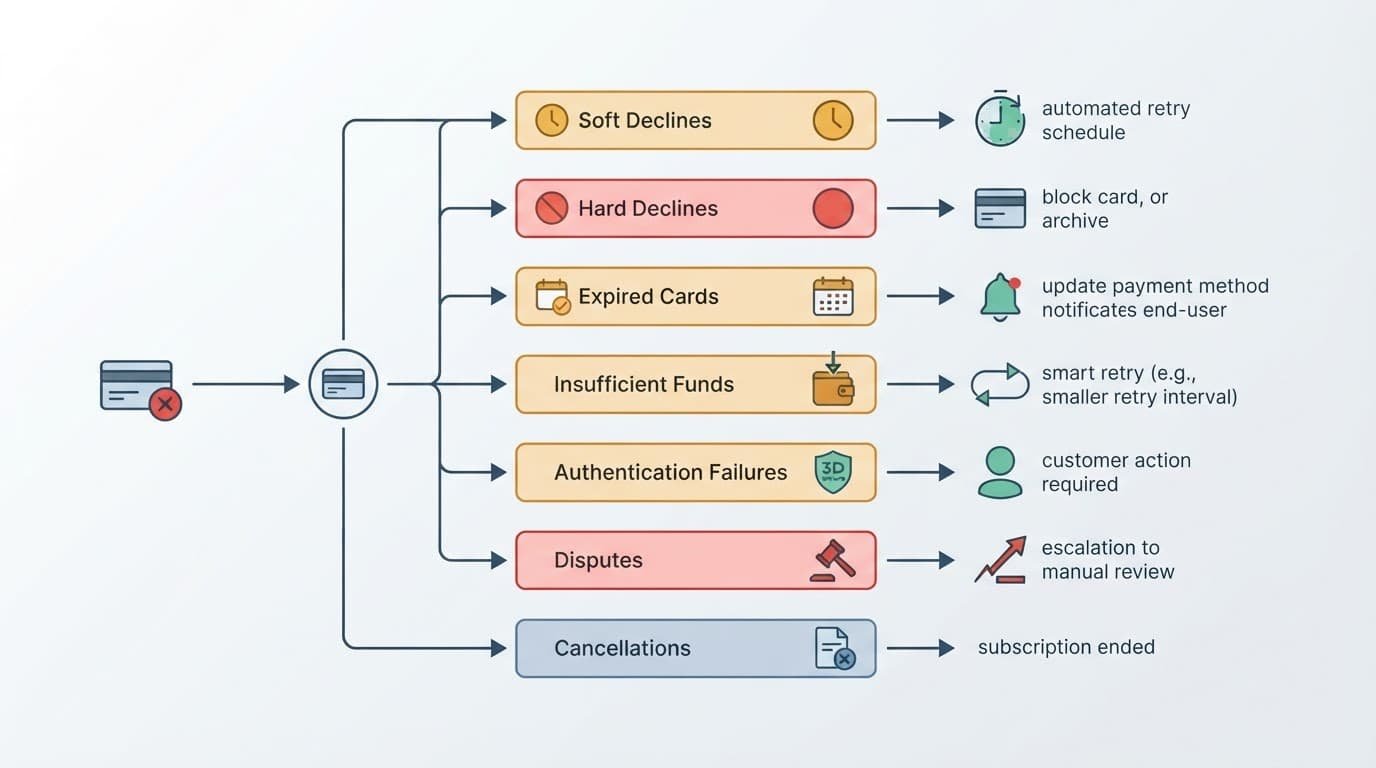
Recoverable errors get constrained retries
Soft declines can result from temporary issuer conditions, generic declines, or processor interruptions. Insufficient funds may also recover, but repeated same-day attempts can annoy customers and create unnecessary fees.
Classify a failure as retry-eligible only when the provider’s code mapping and your policy allow it. Set a maximum attempt count and a final recovery deadline.
Customer action cases need a hosted payment path
An expired card usually calls for a payment-method update. An authentication failure may require the customer to complete a challenge. A hard decline, such as a lost or stolen card signal, should stop automated retries immediately.
| Failure category | Default route | Customer message |
|---|---|---|
| Soft decline | Schedule a limited retry | Optional after the first failure |
| Insufficient funds | Retry later within policy | Ask customer to update payment method |
| Expired card | Pause automatic retries | Send secure update link |
| Authentication failure | Wait for customer action | Send authentication or payment link |
| Hard decline | Stop retries | Ask for a different payment method |
| Dispute or chargeback | Remove from dunning | Route to dispute process |
| Cancellation request | Stop future recovery work | Confirm cancellation terms |
Never disclose detailed decline reasons in email. A message such as “We couldn’t process your renewal payment” gives the customer enough context without exposing potentially sensitive payment signals.
Use trusted events, not assumptions
Billing platforms use different names and timing. Stripe can emit invoice.payment_failed for an unsuccessful collection attempt. Paddle uses a past due subscription state for failed automatic collection. Adyen Auto Rescue has its own rescue lifecycle and references.
Map provider events into a normalized internal event, such as payment_attempt_failed, payment_recovered, payment_action_required, or recovery_window_ended.
Canonicalize every event before acting
A webhook tells you something happened. It does not always tell you the latest truth.
When an event arrives, verify its signature, record its ID, then retrieve the current invoice, payment, or subscription object from the provider. Check whether the invoice is still open, whether the amount is unchanged, and whether a newer successful payment already exists.
A failure event can arrive after a successful retry. Restricting access from the failure webhook alone can lock out a customer who has already paid.
Keep the webhook handler fast. Acknowledge the event after validation and queue downstream work for classification, notifications, support routing, and entitlement changes.
Guard against duplicate webhooks and out-of-order delivery
Providers can deliver the same event more than once, and related events may arrive out of sequence. Stripe’s webhook documentation advises recording event IDs to protect against duplicate deliveries.
Use a unique database constraint on the provider event ID. Then protect the business transition as well. Two different events can still describe the same invoice attempt.
For example, your notification key might be:
invoice_123:attempt_2:payment_update_email
That key prevents an event replay from sending a second reminder. Use a similar idempotency key when creating provider-side objects or retrying API requests. Stripe documents idempotent API requests for this exact protection.
Make retry timing configurable, not universal
Retry timing should be a policy, not hard-coded calendar math. A low-cost self-serve tool may allow a shorter recovery window than an annual B2B platform with human account owners.
Stripe’s Smart Retries documentation shows one provider approach to configurable retry policies. However, provider automation should still fit your own grace period, customer communication, and access rules.
A practical configurable retry sequence
Use relative timing that your team can adjust by plan, payment method, country, and customer segment.
| Phase | Configurable timing | System action | Exit condition |
|---|---|---|---|
| Failure intake | Immediately after verified event | Classify and create recovery record | Paid or route selected |
| First retry | Minutes to one day later | Retry only eligible soft declines | Paid, failed, or action needed |
| Second retry | A few customer-local days later | Retry within attempt budget | Paid, failed, or deadline |
| Final reminder | Before grace ends | Request payment update and state access date | Payment, cancellation, or restriction |
| Recovery close | At configured deadline | Stop retries and apply final state | Closed or recovered |
Avoid retries after a customer cancels, opens a dispute, or replaces the invoice with another payment arrangement. If your provider offers a rescue process, cancel that process when your internal state changes to canceled or disputed.
For recurring cards, watch for a payment-method update or token refresh before scheduling another attempt. The updated method may make a manual retry unnecessary.
Write notifications that match the state
Your first message should be calm and useful. It needs one clear action: update a payment method, complete authentication, or contact support.
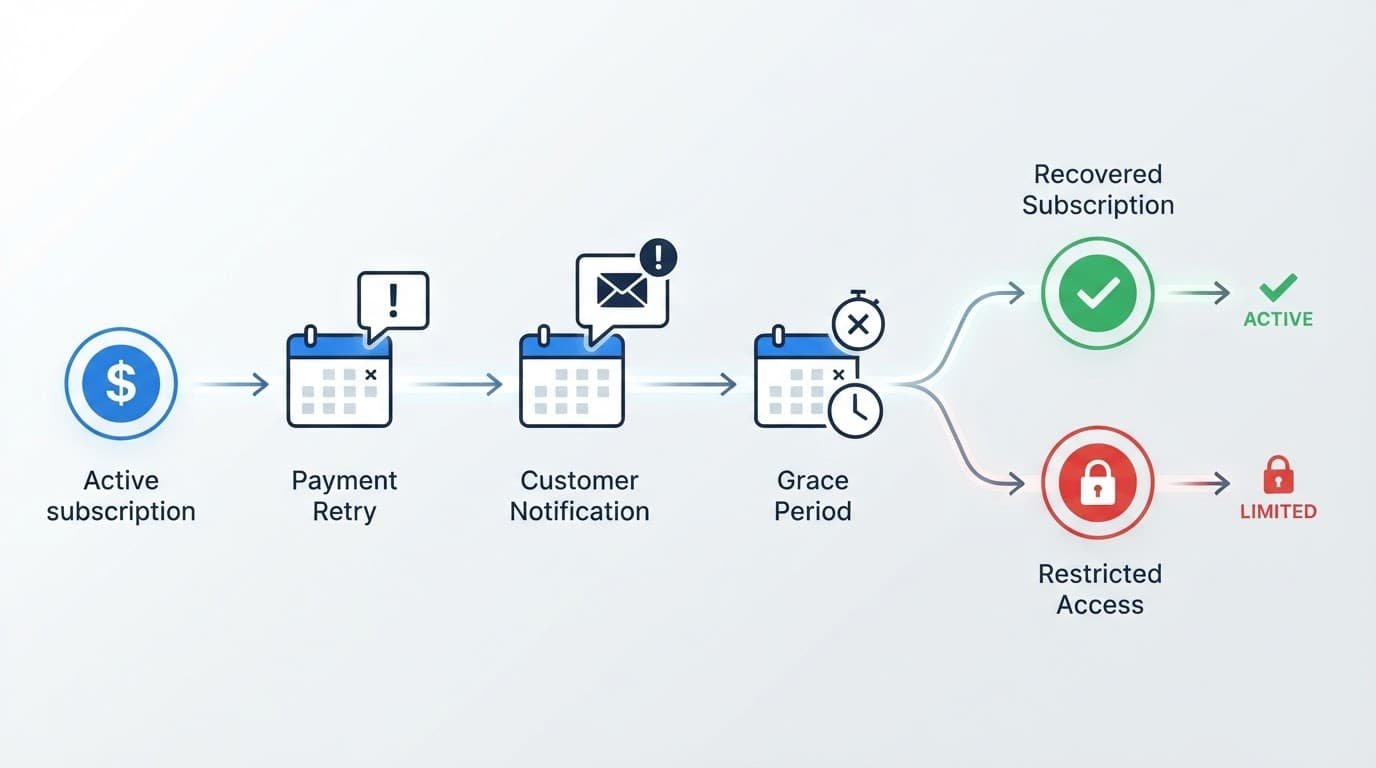
A basic sequence might include an initial notice, a reminder after an unrecovered retry, and a final grace-period notice. Send fewer emails when the provider has already recovered payment. Every queued message should check the latest billing state before delivery.
Use the customer’s locale and time zone
Store event timestamps in UTC. Store the customer’s IANA time zone, locale, and preferred language separately.
Then schedule reminders at reasonable local hours. A final payment notice sent at 2:00 a.m. can create needless urgency and lower trust. Daylight saving changes also matter, so calculate scheduled send times with a time-zone-aware library.
Use localized dates, currency formats, and payment pages. If the account owner works in Paris while the billing admin works in Chicago, send the billing notice to the designated billing contact rather than guessing from the most active user.
Define grace periods and access restrictions
A grace period is a product policy. Start it from a documented event, such as the first failed collection attempt or the invoice due date. Do not mix both rules without recording which one applies.
The period should match the harm of interruption. A design tool may move to read-only access. A payroll or security product may need a longer review path because sudden restriction creates larger customer risk.
Restrict capabilities in stages
Use entitlement flags such as full_access, read_only, and restricted. Avoid deleting customer data during recovery.
A staged approach can look like this:
- Keep full access during the early grace period.
- Move to read-only access after the configured deadline.
- Block new exports, premium automation, or new seats if the account remains unpaid.
- Preserve a route to update payment details and contact support.
When payment succeeds, restore access through the same state machine. Do not rely on an agent manually reversing a lockout.
Create a real support handoff
Open a support task when a case needs judgment. Examples include a customer reporting a broken update link, a high-value account nearing restriction, or repeated authentication failures.
Give the agent only the information needed to help: account ID, invoice reference, broad failure category, last attempt time, next scheduled action, grace deadline, and notification history. Avoid exposing full card data or granular fraud signals.
Agents should be able to resend a secure payment link, extend grace within a policy limit, or pause recovery. Require an audit entry for each override.
Protect payment data and customer privacy
Keep raw card numbers, security codes, and full bank details out of your app, logs, support tickets, and analytics tools. Send customers to a provider-hosted payment update page whenever possible.
The PCI DSS standards apply to environments that store, process, or transmit payment account data. Reducing the payment data your systems handle can reduce operational risk, but it does not remove your responsibility to understand your compliance scope.
If GDPR or similar privacy laws apply, document why you process recovery data, limit access, and follow your retention schedule. Recovery emails should contain the minimum needed to prompt action. They should not include card details, detailed decline codes, or unnecessary account activity.
Use role-based access for billing controls. A support agent may need to extend grace, while only finance or an authorized administrator should cancel an invoice or issue a credit.
Test the workflow before customers depend on it
Test state transitions in a provider sandbox and in your own staging environment. Your test plan should include payment success after failure, repeated events, delayed events, and a customer cancellation during the recovery window.
| Test case | Expected result |
|---|---|
| Soft decline, then successful retry | Invoice closes and entitlements remain or return to full access |
| Expired card, then method update | Customer receives one secure update path and recovery resumes |
| Authentication failure | Background retries pause until customer action or deadline |
| Duplicate failure webhook | One recovery record and no duplicate email |
| Success event arrives before failure event | Account stays active after canonical status check |
| Dispute opens during grace | Dunning stops and dispute route starts |
| Customer cancels before next retry | Queued retry and notices are canceled |
Also test operational failures. Simulate an email-provider outage, a provider API timeout, an expired webhook secret, and a failed queue job. Your system needs retries for its own work, plus an alert when a recovery record has been stuck too long.
Put the Workflow Into Production
A durable failed payment recovery workflow classifies each failure, acts on current billing data, and gives customers a predictable route back to service. It also avoids treating disputes, cancellations, and authentication problems as ordinary retry cases.
Start with a small state machine and a conservative grace policy. Add sophistication only after your team can explain every state transition and support override.
Next-action checklist
- Define internal billing and entitlement states, including recovery, restriction, cancellation, and dispute paths.
- Map your billing provider’s events and statuses to those states.
- Set retry limits, grace periods, and notification timing as editable configuration.
- Add webhook signature verification, event deduplication, and idempotency keys.
- Build secure hosted payment-update and authentication paths.
- Test duplicate events, out-of-order events, payment recovery, disputes, and cancellations.
- Give support documented override rules and an audit trail for every manual change.
