A full demo calendar can still hide a weak pipeline. If reps chase every active contact, high-fit accounts with real buying intent get buried in the noise.
Salesforce account scoring gives your team one shared way to decide which companies deserve attention now. A sound model combines account fit with current buying intent, contact behavior, buying-group activity, and recency, then turns that evidence into clear action.
Start with a transparent scoring model you can explain, audit, and improve. Complexity can wait until the data proves you need it.
What Salesforce account scoring should measure
Account scoring ranks companies, not people. The score answers a practical question: “How likely is this account to become a qualified sales opportunity soon?”
A B2B SaaS account may have five known contacts. One person viewing a blog post is weak evidence of buying intent. A security leader visiting pricing, a product manager attending a demo webinar, and a technical evaluator downloading implementation material create a different pattern.
Account scoring versus lead scoring
Lead scoring measures the readiness or fit of an individual. It supports lead qualification when one person can start and advance a sales conversation.
Account scoring combines signals across contacts and account-level data. That matters when several people influence the purchase, as they often do in mid-market and enterprise SaaS.
Sales Cloud Einstein provides lead-focused scoring based on patterns in conversion data. Availability depends on the applicable entitlement. Its guided setup lets teams choose conversion milestones and create analysis segments. It doesn’t replace a custom account model when your sales motion depends on buying groups.
A high-scoring contact inside a poor-fit company should not outrank an active buying group at an ideal customer account.
Define the business outcome before assigning points
An account scoring program should predict a measurable revenue or pipeline event. “Engaged account” is too vague. Choose one event with a clear Salesforce definition and enough historical data to analyze. Later, compare conversion rate with pipeline quality and sales acceptance when validating it.
For most B2B SaaS teams, useful targets for account-level lead qualification, separate from individual lead readiness, include:
- A sales-accepted account that receives documented first outreach.
- An account associated with a qualified opportunity created within 30 or 60 days.
- An account that reaches a defined pipeline stage, such as discovery completed.
Separate fit from intent
Fit describes whether a company matches your ideal customer profile. Buying intent describes whether people at that company appear to be researching a solution.
Keep these ideas separate in your data model, even if you combine them into one final score. A 5,000-person company in a target industry may be excellent fit but show no current interest. A small company may show intense activity yet lack budget or a usable use case.
This split also improves sales and marketing alignment by making rep feedback more useful. Reps can say, “The fit is right but timing is wrong,” instead of dismissing the entire scoring model.
Choose the signals that deserve weight
Start with fields your team already trusts. A score built on incomplete data enrichment or unreliable web events creates false precision.

Firmographic and technographic fit
Firmographic data usually supplies the stable part of the score. Common fields include employee count, annual revenue band, industry, headquarters region, and whether the account is on a named-account list.
Demographic attributes describe people rather than companies, so use them only when relevant to account fit and governed consistently.
Technographics can improve prioritization when they connect to your product’s use case. A data governance platform might score Snowflake, Databricks, or a modern data warehouse. A support tool may value a help desk platform or ecommerce stack. Don’t award points for every tool in an enrichment record. Add points only when a technology changes the odds of a successful sale.
Engagement and buying-group depth
Behavior scoring translates meaningful activity into points. Pricing-page views, product comparison pages, demo requests, and trial creation often signal stronger buying intent. Webinar attendance and high-intent content downloads can matter too.
Buying-group depth is often stronger than raw activity. Two relevant contacts at the same account should score higher than one person returning repeatedly. Track distinct engaged contacts, seniority, and role coverage where your data supports it.
Avoid points for generic page views, email opens, or old event attendance. These events can inflate activity without improving account prioritization across scoring categories for fit, engagement, and buying-group depth.
Build a weighted B2B SaaS scoring model
Use a 100-point scale for point-based scoring. It’s easy for sales to interpret and leaves enough room for negative scoring. This account scoring example fits a SaaS company selling compliance automation to mid-market technology and financial-services firms.
Treat the rows below as transparent scoring rules, organized into four scoring categories: fit, intent, buying group, and negative signals.
| Signal group | Rule | Points |
|---|---|---|
| Company fit | Target industry | 15 |
| Company fit | 200 to 2,000 employees | 15 |
| Company fit | United States, Canada, or United Kingdom | 5 |
| Technology fit | Uses a supported cloud-data platform | 10 |
| Intent | Pricing or security page viewed in the last 14 days | 10 |
| Intent | Demo request or trial created in the last 30 days | 20 |
| Buying group | Two or more engaged contacts, including a manager or above | 10 |
| Buying group | Security, compliance, or data role identified | 5 |
| Negative signal | Student, job seeker, competitor, or agency domain | -20 |
| Negative signal | No meaningful engagement for 60 days | -10 |
An account could earn 90 points, but high buying intent should never compensate for weak fit. The example gives fit and intent 45 points each, but these numbers aren’t a universal Salesforce standard. That balance prevents a curious but unqualified visitor from looking sales-ready.
Cap any single behavior. For example, award the 10 pricing-page points once in a 14-day period, not for every visit. Otherwise, a bot, researcher, or employee can distort the score.
Create fields that make the score explainable
Don’t begin with a single opaque number. For account scoring, create component fields on the Account object so users can see why an account ranks where it does.
A practical first version might include Fit Score, Intent Score, Buying Group Score, Negative Score, Account Score, Score Band, Last Meaningful Engagement Date, and Scoring Version. These are illustrative custom fields, not standard Salesforce fields unless your organization has configured them separately. Use number fields for components and a picklist for the band.
Keep source fields close to their owners
Marketing should own campaign membership, form source, web-event definitions, and governed data enrichment updates. Keep lead attribution rules clear, rather than mixing campaign or source credit into fit or intent points.
Sales or RevOps should own account tier, named-account status, disqualification reasons, and opportunity outcomes.
Store durable facts on Account. Keep person-level details on Lead and Contact. If you use a custom Engagement object, retain event type, event date, source, and related Contact or Lead to preserve engagement history.
Simple score components can live in formula fields. Salesforce’s formula-field guidance is useful for calculations based on fields available on the same record. However, a formula field on Account cannot reliably sum standard Contact activity across a lookup relationship by itself.
For cross-record calculations, use Flow, Apex, Data Cloud, or a managed tool based on your volume, licensing, and governance needs.
Implement the model with Salesforce fields and Flow
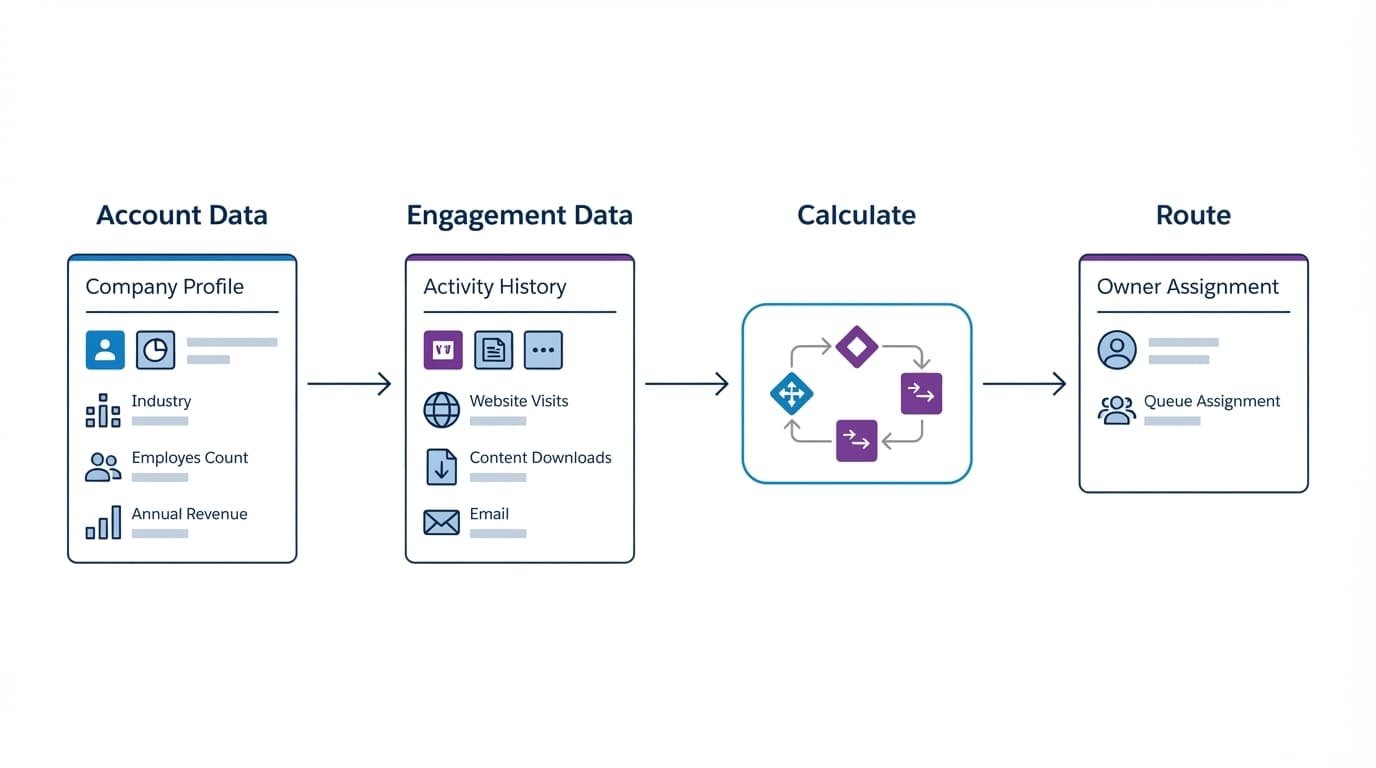
For a small or growing team, custom fields and Flow provide a practical foundation for account scoring. This workflow automation approach uses record-triggered and scheduled flows. It stores the final score directly on the Account record, where it works in reports, list views, queues, and routing rules.
Use a controlled recalculation path
A dependable build has four stages:
- Write known fit fields to Account through enrichment, imports, or governed updates.
- Capture meaningful engagement on Contact, Lead, Campaign Member, or a custom Engagement record.
- Run a flow that updates account-level component fields and the final score.
- Update the score band, task, queue, or account owner only when the account crosses a threshold.
Salesforce’s Update Records element can write the new Account values after the flow calculates them. Use entry conditions so every trivial edit doesn’t trigger a full recalculation.
Roll up people without double-counting them
Contact and Lead records often sit in different stages of the funnel. Decide how your model handles both before building automation.
Person-level lead scoring shouldn’t become an Account score without matching and ownership logic. A common rule is to include converted leads as Contacts and score only Contacts linked to an Account. For open leads, use a matching rule or an account-assignment process before rolling their activity up. Don’t silently attach leads to companies based only on free-email domains.
For each Account, calculate counts such as “engaged contacts in last 30 days” and “senior contacts engaged in last 30 days.” Then award buying-group points once the count reaches the rule. This avoids adding 10 points every time an existing contact completes another activity.
At higher volumes, a scheduled flow that recalculates active accounts daily is often safer than a maze of additive updates. The basic approach doesn’t require a separate data platform. If Flow limits, complex identity matching, or large engagement volumes become an issue, data cloud, Apex, or another data platform may become appropriate only when those constraints justify it.
Apply score decay and block false positives
Intent expires, so behavior scoring must account for fading buying intent. An account that watched a webinar six months ago should not outrank a current evaluator because its old points remain untouched.
Set a last-meaningful-engagement date whenever an account completes a high-intent action. Then use a daily or weekly scheduled flow to subtract points after 30, 60, or 90 days without qualifying activity. Reset the decay when a new high-intent event arrives.
Filter activity before it affects the score
Bad data is more damaging than missing data. Exclude known internal domains, competitors, partners, agencies, students, job seekers, and test records. Assign exclusion governance to revenue operations, where that function exists, and create a Scoring Exclusion Reason field instead of deleting the evidence.
Also filter suspicious web activity. Repeated page loads from one browser, form submissions with disposable addresses, and visits with no identifiable person should not add strong points. Coordinate with your web and marketing teams on bot filtering before event data reaches Salesforce.
Track an Excluded From Scoring checkbox, and require every automation path to check it before writing account points.
Turn score bands into a sales and marketing handoff
A score is useful only when it changes who receives attention and what someone does. Use it for account prioritization, then define the response before publishing the model.
| Score band | Suggested action | Owner |
|---|---|---|
| 70 to 100, Priority | Review for sales readiness, create a task, and assign the next step through sales routing within one business day | Account executive or SDR |
| 40 to 69, Watch | Add to a coordinated account-based marketing campaign with SDR visibility and review weekly | Marketing with SDR visibility |
| 0 to 39, Nurture | Keep in relevant education programs and suppress broad sales tasks | Marketing |
| Below 0, Excluded | Stop automated scoring and document the reason | RevOps or marketing ops |
The Priority threshold signals sales readiness for seller review, not a guaranteed opportunity. This handoff applies at the account level, while lead qualification still applies to individual contacts.
Give reps context, not only a number
Add the top contributing signals to the Account page layout. A rep needs to know whether 78 points came from a named-account tier and a demo request, or from weaker interactions that don’t show current buying intent.
Set a service-level agreement for Priority accounts. The assigned seller should accept, reject, or return the account within a defined period. Require a reason for rejection, such as wrong segment, existing customer, no active project, or bad data.
That feedback supports sales and marketing alignment in the next scoring review. Without it, marketing sees silence and assumes sales ignored strong accounts, while sales sees low-quality work and loses trust in the score.
When Einstein, Account Engagement, and Data Cloud fit
Use predictive scoring, which learns from conversion patterns, only after your basic fields and definitions are stable. A model cannot repair inconsistent opportunity stages, missing account matches, or unclear conversion criteria.
Sales Cloud Einstein is designed for lead scoring, not transparent account scoring. It requires the relevant Sales Cloud Einstein entitlement, rather than appearing in every edition. In Sales Engagement, Salesforce documents options to score all leads or only leads that meet selected criteria in its Einstein Lead Scoring setup.
Data Cloud and Marketing Cloud account scoring
Marketing Cloud Growth can support account-oriented scoring when unified data is available across sources. Unified account signals can also support account-based marketing and coordinated target-account programs.
Calculated Insights are one option for deriving account metrics in this setup. Salesforce explains that Calculated Insights can aggregate data model objects into metrics and derived scores.
This route can be strong for teams with multiple data sources and identity-resolution needs. Calculated Insights also add product, data-model, and operating complexity. Availability, data-model setup, identity resolution, and calculations depend on your organization’s products and configuration.
Marketing Cloud Growth scoring rules and publication behavior should be checked against current Salesforce documentation before launch. Salesforce notes that rule changes require republishing the model in its scoring considerations.
For many early-stage SaaS teams, a transparent custom Account scoring model using point-based scoring is the better first release than predictive or platform-based approaches.
Validate the model against real pipeline outcomes
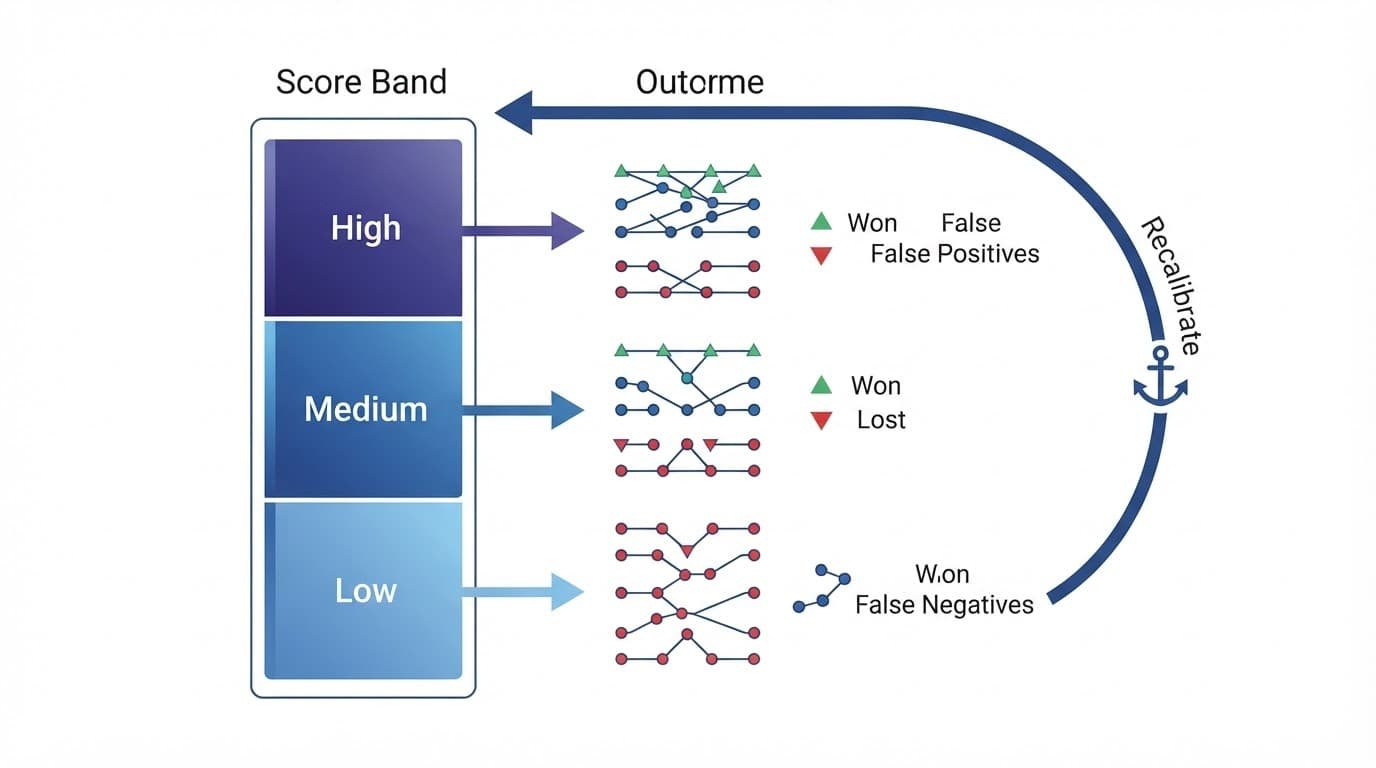
Treat every scoring model as a test, using historical data and enough outcome history. Judge both custom and predictive scoring by actual outcomes, not activity volume. After 60 to 90 days, compare score bands with accepted accounts, opportunity creation, pipeline value, conversion rate, and closed-won rate.
Look for the failures that matter
Review accounts that scored above 70 but produced no useful sales conversation. Check whether recent activity reflected meaningful buying intent, rather than bot activity or stale signals. Then check weak fit data, incomplete engagement history, incorrect lead attribution, a missing disqualification rule, or an unrealistic response expectation.
Then review closed-won accounts that began below the handoff threshold. If many appear there, the downstream lead qualification process may underweight signals such as target technology or multiple technical evaluators.
Document each change in the Scoring Version field or a simple change log. Let sales feedback and marketing analysis jointly guide controlled calibration, supporting sales and marketing alignment. Change one or two weights at a time. If you rewrite the entire model every month, you will never know which adjustment improved results.
Key takeaways for a reliable model
Start with an outcome that sales and marketing both recognize, then score fit and intent separately. Use account-level fields for the final score while preserving the individual signals that explain it.
Add negative points, decay stale activity, and use buying-group evidence to reduce noise. Tie each score band to a clear owner and response standard.
Salesforce account scoring works when it focuses sales attention on accounts with credible fit and timely evidence of interest.
Build the first version, then earn complexity
A 100-point scoring model with clear rules is more useful than a predictive score nobody trusts. Start with point-based scoring, your best account attributes, a small set of high-intent events, and a visible handoff process.
Review outcomes with sales on a fixed schedule to support sales and marketing alignment. The strongest model is not the one with the most data. It is the one your team uses, questions, and improves.
FAQs
How many points should an account need before sales outreach?
Start with a threshold that creates a manageable weekly volume for the sales team. In a point-based scoring model, 70 on a 100-point scale is a reasonable initial Priority band. Treat it as a starting rule, then compare high-score accounts with accepted opportunities and sales feedback. The score supports prioritization and lead qualification, but it doesn’t replace seller review.
How does account scoring differ from lead scoring?
Account scoring evaluates company fit and combined engagement across a buying group. Lead scoring focuses on an individual contact’s profile and actions. Use account-level signals to prioritize companies, then guide contact-level follow-up within those accounts.
Should a demo request always create a Priority account?
A demo request is strong intent, but it should not erase clear disqualification signals. Add substantial points for the request, then let negative scoring block job seekers, competitors, unsupported regions, or accounts below your minimum customer profile.
Can Salesforce calculate account scores without Data Cloud?
Yes. Custom Account fields, formula logic, and Flow can support a transparent scoring model. Cross-record rollups across Contacts and engagement data need deliberate automation. Very large datasets may require Apex or a separately licensed data platform.
How often should a B2B SaaS team recalibrate its scoring model?
Review scoring quality monthly during the first quarter after launch. Compare pipeline acceptance and conversion rate across score bands. Once the model is stable, a quarterly review usually works. Revisit it sooner when your target market, pricing, product, or sales process changes.
