A campaign name can look harmless until it breaks a quarterly report, splits paid media data, or sends an automation down the wrong path. HubSpot campaign naming is not a cosmetic task. It is a shared operating rule for how your team finds, measures, and reuses campaign work.
Small teams feel the pain quickly because one person often creates campaigns, tracking URLs, emails, forms, and workflows. A clear governance model keeps that work connected as the business grows.
The goal is a naming system people can follow without opening a 40-page policy document.
Key Takeaways
- Use one campaign syntax that reflects the dimensions you need to filter in reports.
- Keep each token short, controlled, and easy to recognize across HubSpot assets.
- Treat live campaign names and UTM values as historical records, not casual labels.
- Give campaign creators, operations owners, and approvers clear responsibilities.
- Run a lightweight exception and audit process so standards survive real deadlines.
Why Campaign Naming Needs Governance
Most naming problems begin with reasonable shortcuts. A marketer creates Spring Webinar, another creates Q2_Webinar, and a founder names a related paid campaign Webinar Leads. Each label makes sense alone. Together, they fragment the same initiative across searches, reports, and spreadsheets.
That fragmentation becomes costly when you need a simple answer: Which campaign drove qualified pipeline in North America last quarter? If names carry inconsistent regions, dates, channels, or initiative labels, people start cleaning data by hand. Then different dashboards produce different answers.
A governance model solves the problem at the source. It defines the format, who can create names, which values are allowed, and what happens when a real campaign does not fit the standard. The approach is useful even for a one-person marketing team because it protects future reporting.
HubSpot campaigns can group related marketing assets, but they do not replace a reporting model. You still need consistent definitions for initiatives, channels, lifecycle stages, and conversion events. The HubSpot community discussion on campaign practices makes the same practical point: settle a naming convention early, before your asset library becomes difficult to manage.
A campaign name should identify the work, support reporting, and remain understandable six months later.
Governance also reduces unnecessary cleanup. When people know the approved format before launching a campaign, they spend less time asking whether an email, form, workflow, and tracking URL belong to the same initiative.
Start With Reporting Questions, Not Name Components
A campaign taxonomy should answer the questions your business already asks. Start with recent board updates, pipeline reviews, acquisition reports, and channel performance dashboards. Look for the filters people use repeatedly.
For a small B2B SaaS company, those questions often include:
- Which region produced demo requests for a launch?
- Which business unit or product line generated opportunities?
- Did an event, content offer, partner effort, or product release drive engagement?
- Which channel brought the contact to the campaign?
- Which quarter should own the spend and pipeline?
Those questions point to the fields your name needs. They also reveal which data should live elsewhere. Campaign names are useful for grouping and finding work. They are poor replacements for structured properties such as lifecycle stage, persona, industry, deal amount, or product tier.
For example, do not add the target job title to every campaign name if you already track persona in a contact property. The extra token adds clutter and creates more ways to spell the same thing. Keep the naming syntax focused on stable dimensions needed for campaign organization and broad reporting.
Before publishing your standard, create a small controlled vocabulary. Decide whether your region value is NA, EMEA, and APAC, or whether you need country codes such as US and CA. Decide whether paid search is PAIDSEARCH, PPC, or SEM. Pick one term, document it, and stop treating variants as interchangeable.
A HubSpot naming convention guide can help with asset-level taxonomy ideas. However, your final vocabulary should match your own reporting model, team structure, and market coverage.
Use One HubSpot Campaign Naming Syntax
A practical baseline syntax is:
[Region]_[Business Unit]_[Campaign Type]_[Initiative]_[Channel]_[YYYY-Q#]
For example:
NA_CORE_PRODUCTLAUNCH_ATLASCLOUD_PAIDSEARCH_2026-Q3
This name tells a teammate that the campaign targets North America, belongs to the core business unit, supports a product launch called Atlas Cloud, runs through paid search, and belongs to the third quarter of 2026.
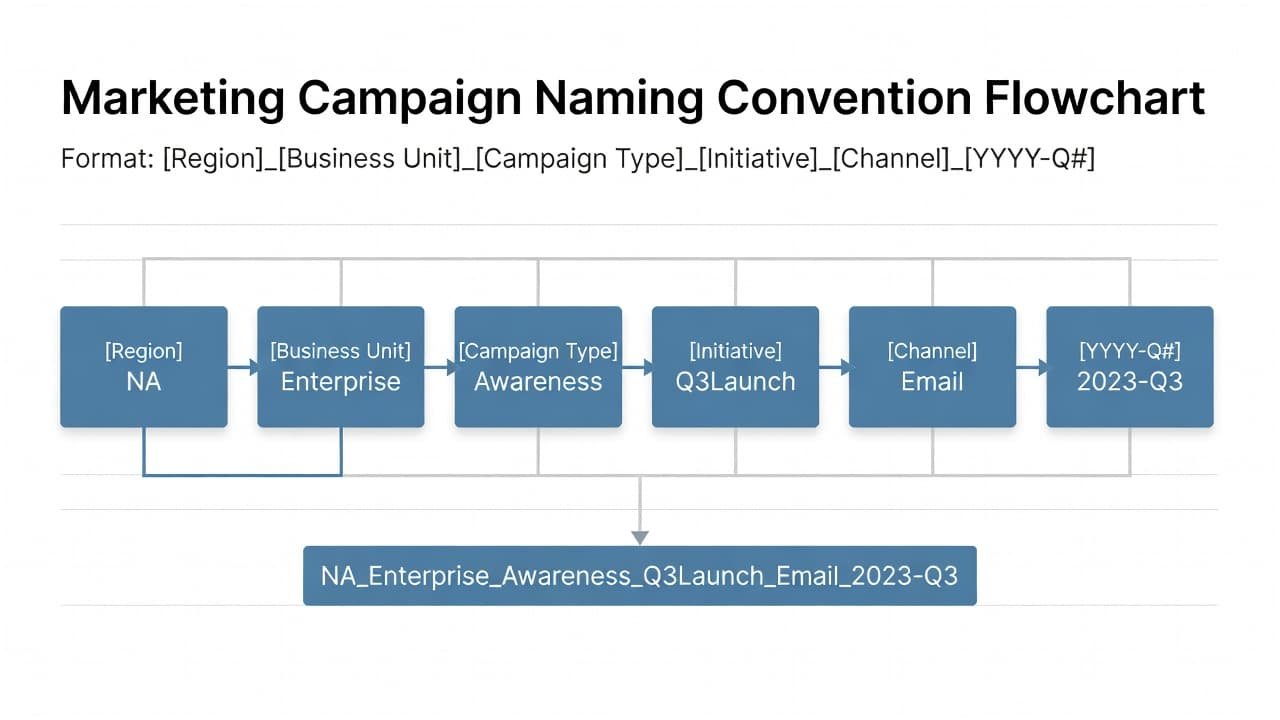
Each component has a job. Avoid adding a token because it feels useful in the moment. If a component cannot support a search, filter, budget view, ownership decision, or comparison, leave it out.
| Component | Example value | What it identifies |
|---|---|---|
| Region | NA | The geographic market or reporting territory |
| Business Unit | CORE | The product group or business line |
| Campaign Type | PRODUCTLAUNCH | The broad motion, such as webinar, event, nurture, or launch |
| Initiative | ATLASCLOUD | The approved internal initiative or offer name |
| Channel | PAIDSEARCH | The primary distribution channel |
| Time period | 2026-Q3 | The reporting quarter |
The format is intentionally rigid. An underscore separates tokens, while hyphens can stay inside a value only if your team permits them. Avoid spaces, slashes, emojis, and punctuation that may create inconsistent exports or awkward URL values.
Adapt the components when your reporting model needs a different order. A product-led SaaS business may need Product instead of Business Unit. A regional service company may remove Region and use Market or Location. The important part is consistency. Every campaign must use the same sequence and controlled values.
Keep the initiative token recognizable but compact. ATLASCLOUD is easier to search than Atlas_Cloud_Enterprise_Release_With_New_Analytics. If there are several waves of one initiative, use a version only when reporting requires it, such as ATLASCLOUDV2.
Set Rules That People Can Apply Under Pressure
Governance fails when it asks campaign creators to interpret vague advice. “Use clear names” sounds sensible, but it produces a dozen personal standards. Write rules that remove uncertainty.
First, use uppercase values if that is your approved style. Uppercase makes NA_CORE_PRODUCTLAUNCH_ATLASCLOUD_PAIDSEARCH_2026-Q3 easier to scan and reduces case variations in exports. If your team prefers lowercase, use lowercase everywhere instead.
Next, publish an approved-value list for each token. Store it where people work, such as a Notion page, Google Sheet, or internal wiki. A dropdown-based request form can prevent misspellings before they reach HubSpot.
Use these operational rules:
- Create the campaign name before building associated assets or publishing tracking URLs.
- Copy the approved name into the HubSpot campaign record and related planning documents.
- Do not rename a live campaign without operations review and a documented reason.
- Retire old values when terminology changes, but keep historical names intact.
- Use
TBDonly in private planning records, never in published HubSpot assets.
Live names need special care. A renamed campaign may remain understandable to people, yet URLs, external ad platforms, exports, and historical reports may still contain the old value. In other words, a quick cleanup can make comparison harder instead of easier.
The same discipline applies to workflows, lists, forms, and emails. They can use a related but asset-specific convention. For instance, a workflow might begin with WF_, while a form begins with FORM_. The HubSpot community’s workflow taxonomy discussion includes useful examples of naming assets so teams can find them later.
Connect Names to Reporting, Attribution, and Automation
Campaign names support reporting, but names alone do not create reliable attribution. Attribution depends on your HubSpot subscription, report configuration, connected ad accounts, lifecycle setup, tracking quality, and the fields your team uses. Verify the behavior in your own portal before you promise a stakeholder a specific report.
For campaign reporting, the naming syntax gives you predictable filters. You can search for NA_CORE to review North American core-business activity. You can also filter on 2026-Q3 when preparing a quarter-end review. That is much cleaner than searching for campaign titles that mix dates, initials, and creative descriptions.
Tracking URLs need equal care. When you create HubSpot tracking URLs, populate utm_campaign with the approved campaign identifier or an agreed reporting value. If a paid search team uses ATLASCLOUD_Q3 while email uses Atlas Cloud Launch, Google Analytics and other analytics tools will treat them as separate campaign values.
A guide to HubSpot campaign tracking provides useful context on connecting campaign activity and tracking conventions. Match the UTM taxonomy to your reporting plan, but do not assume every URL parameter must duplicate the full HubSpot campaign name. Some teams use a shorter UTM value for ad-platform constraints. Document the mapping when you do.
Automation also benefits from consistent names, although workflows should not rely on text matching when a durable property can do the job. A workflow enrollment trigger based on “campaign name contains ATLASCLOUD” can work for a temporary process. A dedicated campaign or source property is safer for a long-running operational workflow.
Integrations create another reason to be precise. Zapier, Make, Segment, ad platforms, webinar tools, and data warehouses may receive campaign text as a field value. A small change to PAIDSEARCH can split data downstream into PAID_SEARCH, PPC, and Paid Search. Before changing an approved token, check every connected system that reads it.
Give Every Role a Clear Job
A lightweight approval model protects data without creating a bottleneck. The number of people involved can stay small, but their ownership must be clear.
| Role | Primary responsibility | Decision rights |
|---|---|---|
| Campaign creator | Requests the name, builds assets, and uses approved values | Can create low-risk campaigns from the standard |
| Operations owner | Maintains the taxonomy, templates, and audit log | Approves controlled values and process changes |
| Approver | Confirms alignment with budget, region, product, or launch plan | Approves high-impact or unusual campaigns |
The campaign creator should submit a short intake before building anything public. The request can include the proposed name, campaign objective, owner, launch date, core channel, expected assets, and tracking requirements. For routine work, a form can validate most values through dropdowns.
The operations owner maintains the source of truth. That person does not need to approve every newsletter or small test. Instead, they own the controlled vocabulary, decide when a new initiative code is needed, and protect historical consistency. In a startup, this may be a demand generation lead, RevOps manager, or founder with CRM ownership.
Approvers should focus on material campaigns. Product launches, paid media programs, partner campaigns, and multi-region efforts deserve a quick review before launch. The approver checks whether the business unit, initiative, timing, and channel match the actual plan.
Use a simple exception process when the standard does not fit. The creator submits the requested name and explains why the existing values fail. The operations owner responds with one of three decisions: approve the exception, add a new controlled value, or revise the proposed campaign to fit the existing model. Record the decision in a shared log.
Do not create permanent taxonomy changes for one-off experiments without a clear reporting need. Exceptions should remain visible, but they should not turn the standard into a list of special cases.
Audit the System Before Reporting Breaks
Naming governance needs a regular checkup. A quarterly audit works for many small teams because it lines up with campaign reviews and planning cycles. Teams with frequent paid media launches may prefer a monthly spot check.
Review campaigns created during the period and look for missing tokens, invalid values, duplicate initiative names, unapproved channels, and inconsistent dates. Compare tracking URLs against the campaign register. Then inspect a few workflows, forms, emails, and external integrations connected to major campaigns.
Track a short set of operational measures:
- The share of new campaigns that match the approved syntax
- The number of exceptions requested and approved
- The number of duplicate or retired values found
- The time required to prepare campaign reporting
- The count of reporting discrepancies traced to naming or UTM issues
Fix what you can without rewriting history. For a draft campaign, correct the name immediately. For a live campaign, document the issue, preserve historical reporting, and use the standard on future assets. If an error affects a key dashboard, add a reporting note or mapping rule rather than silently editing records.
HubSpot features, permissions, campaign tools, and reporting options can differ by subscription and portal configuration. Product behavior also changes over time. Before you build governance around a feature such as campaign asset association, attribution reporting, or automated controls, test it in your HubSpot account and review current product documentation. Guidance on using HubSpot campaigns effectively can help you compare your process with common implementation patterns.
Build a System Your Team Will Actually Use
Start with ten recent campaigns. Rename only drafts, then list the historical patterns you find. Those real examples will show where your current language conflicts, where a value list is missing, and which components your reports actually need.
Publish the syntax, approved values, sample names, role definitions, and exception form in one location. Add the convention to campaign briefs and launch checklists. A creator should be able to find the standard in under a minute.
The strongest HubSpot campaign naming governance is boringly consistent. When a campaign name behaves like dependable operating data, reporting becomes easier and your team spends less time translating its own work.
