Picking a finance system for a SaaS company gets expensive when you choose for today’s pain and ignore next year’s close. A tool can look fine in a demo, then break down when renewals, credits, deferred revenue, and entity growth show up.
If you’re weighing NetSuite, Sage Intacct, and QuickBooks in 2026, the real question isn’t which brand looks stronger. It’s which one fits your revenue model, reporting needs, controls, and team capacity.
The useful comparison starts with SaaS workflows, not feature checklists.
The SaaS finance requirements that matter in 2026
A SaaS company doesn’t outgrow accounting software because invoices get bigger. It outgrows software because the operating model gets harder to map into the ledger.
Start with revenue recognition. If you need support for ASC 606 or IFRS 15, contract changes, bundled deals, ramp pricing, credits, and deferred revenue schedules matter more than invoice templates. NetSuite and Sage Intacct both position their products around automated revenue workflows. NetSuite’s software and SaaS revenue recognition guide and Sage Intacct’s revenue recognition module show where vendors focus their product depth.
Next comes structure. SaaS finance teams usually need multi-entity support, intercompany eliminations, approval flows, audit trails, and dimensional reporting. You also need clean integrations with CRM and billing. That often means Salesforce or HubSpot on one side, then Stripe Billing, Chargebee, Zuora, or Maxio on the other.
A SaaS ledger usually fails at the contract layer first, not at the invoice layer.
Reporting is the last filter, and many buyers underweight it. Board packs need ARR, MRR, churn, expansion, contraction, cohort views, and a bridge from billed bookings to recognized revenue. In practice, that reporting rarely lives in one system. A good finance platform should support it without forcing manual exports every month.
A useful way to frame the market is simple. QuickBooks fits early-stage teams with one entity and simpler close needs. Sage Intacct fits finance-led SaaS teams that need stronger accounting depth without buying a full ERP. NetSuite fits companies that want broad operational scope, often across finance plus CRM, inventory, subsidiaries, or more formal process design. That split also lines up with many findings in this software/SaaS ERP comparison.
A practical comparison at a glance
This is the short version buyers usually need before they book demos.
| Decision area | NetSuite | Sage Intacct | QuickBooks Online Advanced |
|---|---|---|---|
| Core fit | Broad ERP with finance at the center | Finance-first cloud accounting | Early-stage accounting for simpler ops |
| ASC 606 / IFRS 15 | Strong, often with deeper modules | Strong native focus for finance teams | Limited, often manual or app-assisted |
| Deferred revenue | Mature workflows | Mature workflows | Basic workarounds common |
| Multi-entity | Strong | Strong | Weak for true multi-entity needs |
| Dimensional reporting | Good, flexible segments | Very strong with dimensions | Limited classes and locations |
| Close and approvals | Strong controls, more setup | Strong controls, finance-friendly | Basic controls |
| CRM and billing integrations | Broad ecosystem, native suite options | Strong finance integrations | Good app ecosystem, but lighter sync depth |
| ARR, MRR, churn reporting | Possible, often needs billing or BI layer | Better finance views, still often needs BI | Usually off-platform |
| Implementation burden | Highest of the three | Moderate | Lightest |
| Typical first-year cost, May 2026 | Often $40K to $300K+ | Often $25K to $85K | Often $2.8K to $7.8K |
The table hides an important truth. SaaS reporting quality depends on your data flow as much as the ledger. Even with NetSuite or Intacct, cohort analysis and board-grade ARR bridges often end up in a billing tool, warehouse, or BI stack.
Pricing also needs care. As of May 2026, QuickBooks Online Advanced is around $235 per month. NetSuite and Intacct pricing still varies heavily by users, modules, entities, and partner scope. Buyers should confirm current packaging, implementation assumptions, and renewal terms directly with vendors.
How each platform fits in practice
NetSuite
NetSuite is usually the conversation when finance needs start bleeding into broader operations. If your team wants finance, CRM, subsidiaries, procurement, and possibly inventory or more formal approval structures in one system, NetSuite starts to make sense.
For SaaS finance, the upside is breadth. Multi-entity structures, consolidated reporting, approvals, audit controls, and more complex revenue rules are part of the normal buying motion. That matters if your company is moving past a single-US-entity setup or if finance is trying to stop stitching together five disconnected tools.
The tradeoff is weight. NetSuite projects often take months, not weeks. Public market data and partner estimates in 2026 often put implementation at roughly 4 to 9 months, and longer if you add many modules or messy source data. It also helps to have an internal admin or a partner you trust after go-live, because small changes can become system projects.
NetSuite can be too much for an early SaaS team. If you only need cleaner month-end close, stronger rev rec, and better consolidated reporting, the full ERP scope may create cost and change management you don’t need yet.
Sage Intacct
Sage Intacct usually enters when QuickBooks has become a spreadsheet farm, but the company still doesn’t want a broad ERP. That’s why it often fits finance-led SaaS teams well.
Its strength is accounting depth. Intacct is well suited for multi-entity work, revenue recognition, dimensional reporting, approval workflows, and finance controls. For SaaS companies, that means better handling of deferred revenue, cleaner entity reporting, and less manual close work. Sage also frames Intacct around SaaS use cases in its subscription and SaaS finance overview.
Dimensions are a real advantage here. Finance teams can report by entity, customer type, department, product line, or other slices without rebuilding the chart of accounts every time the business changes. That matters when leadership asks for MRR by segment one week and gross retention by channel the next.
The limitation is scope. Intacct is finance-first, not a full operational suite. That’s fine for many SaaS teams, but it means integrations carry more weight. If Salesforce is central, Sage’s Advanced CRM Integration for Salesforce is part of the evaluation, not an afterthought.
Implementation burden usually lands between QuickBooks and NetSuite. A pure finance rollout may go live in 2 to 4 months, but contract cleanup, billing sync design, and reporting redesign can stretch that.
QuickBooks
QuickBooks still has a place in SaaS finance, but that place is narrower than many founders expect. For a small team with one entity, simple subscription terms, limited approvals, and cash-focused reporting, it can be good enough for a while.
The appeal is obvious. Cost is low, deployment is fast, and bookkeepers already know the product. If your biggest need is accurate books, invoicing, bank feeds, and basic monthly reporting, QuickBooks can keep pace.
The problem starts when SaaS accounting stops being basic. Revenue recognition is the clearest fault line. A monthly subscription business with annual prepaids, amendments, credits, usage fees, and audit pressure will run into manual work quickly. This summary of QuickBooks revenue recognition limitations is vendor-biased, but the checklist is still useful because it mirrors the real gaps finance teams hit.
Multi-entity management is another weak point. So are formal approvals, deeper audit controls, and board-ready SaaS metrics. QuickBooks has an app ecosystem, but app stacks can become fragile when finance depends on them for core accounting logic. A practical view from the market is that QuickBooks remains a fit for simpler, single-entity businesses, which aligns with this QuickBooks vs Intacct fit guide.
If you’re already building deferred revenue schedules outside the system, exporting data every month for ARR analysis, and reconciling billing by hand, QuickBooks isn’t saving time anymore.
Revenue recognition, billing, and SaaS metrics
This is where most SaaS selections should be won or lost.
NetSuite and Sage Intacct both support serious revenue recognition needs. QuickBooks usually depends on manual processes or outside apps. For a founder, that may sound manageable. For a controller signing off on ASC 606, it usually isn’t.
Billing compatibility matters just as much. If your contract source lives in Salesforce and your invoicing lives in Chargebee or Stripe Billing, finance needs reliable data flow between contract, bill, cash, and revenue. Sage’s Chargebee to Sage Intacct sync shows the kind of workflow SaaS teams want, where billing events move into accounting without re-keying. NetSuite also has broad connector options, although the exact path depends on your CRM and billing stack.

ARR and MRR are another common trap. Buyers often expect the accounting system to produce every SaaS metric natively. That rarely happens. NetSuite and Intacct can support stronger recurring revenue reporting, but most teams still combine accounting data with CRM, billing, and sometimes product data to get churn, expansion, contraction, and cohort views right.
In other words, don’t buy a ledger and expect a full metrics warehouse. If your board relies on cohort analysis, plan the reporting stack at the same time you plan the finance system. That’s also where related reads on SaaS revenue recognition and accounting tech stack design become useful.
Month-end close, approvals, and controls
In 2026, close speed is no longer a vanity metric. It affects forecast quality, board confidence, and audit stress. Recent benchmarks show many teams still closing in roughly six days, while stronger SaaS teams with more automation push closer to two to four.
NetSuite and Intacct are both credible options for a tighter close. They handle approval routing, recurring entries, deferred revenue schedules, consolidations, and audit trails with far less spreadsheet dependence than QuickBooks. Intacct often feels more finance-native for controllers. NetSuite often wins when the close touches multiple business processes outside the GL.

QuickBooks can support a clean close for a small team, but it struggles once approvals, entity structures, and deferred revenue get complicated. The cost isn’t only extra work. It’s also control risk, because key judgments drift into side spreadsheets that auditors and new hires can’t follow easily.
If month-end pain is driving your search, map the exact tasks that break today. Don’t settle for broad claims about automation. Ask each vendor to show contract amendment handling, approval routing, intercompany work, and the audit trail for a deferred revenue entry.
If the demo never shows a contract modification, it isn’t a serious SaaS demo.
Common mistakes in software selection
Most bad finance system choices come from bad scoping, not bad products.
- Buyers compare headline features and skip transaction flow. Revenue starts in CRM or billing, not in the GL.
- Teams let IT or founders drive selection alone. Finance, RevOps, and billing owners all need input.
- Demos focus on dashboards. The hard parts are amendments, credits, approvals, and entity consolidation.
- Costs get modeled too narrowly. Services, integrations, admin support, and renewal increases change the math.
- Companies buy for the current org chart. Twelve months later, the real issue is a new entity, audit prep, or a new pricing model.
Another mistake is assuming one system should do everything. For many SaaS companies, the right answer is a clean split: CRM for pipeline, billing for contracts and invoices, accounting for the ledger, and BI for board metrics. The choice is less about product loyalty and more about where each workflow should live.
A step-by-step buying process for finance leaders
A better process doesn’t need to be fancy. It needs to be honest about current pain and near-term change.
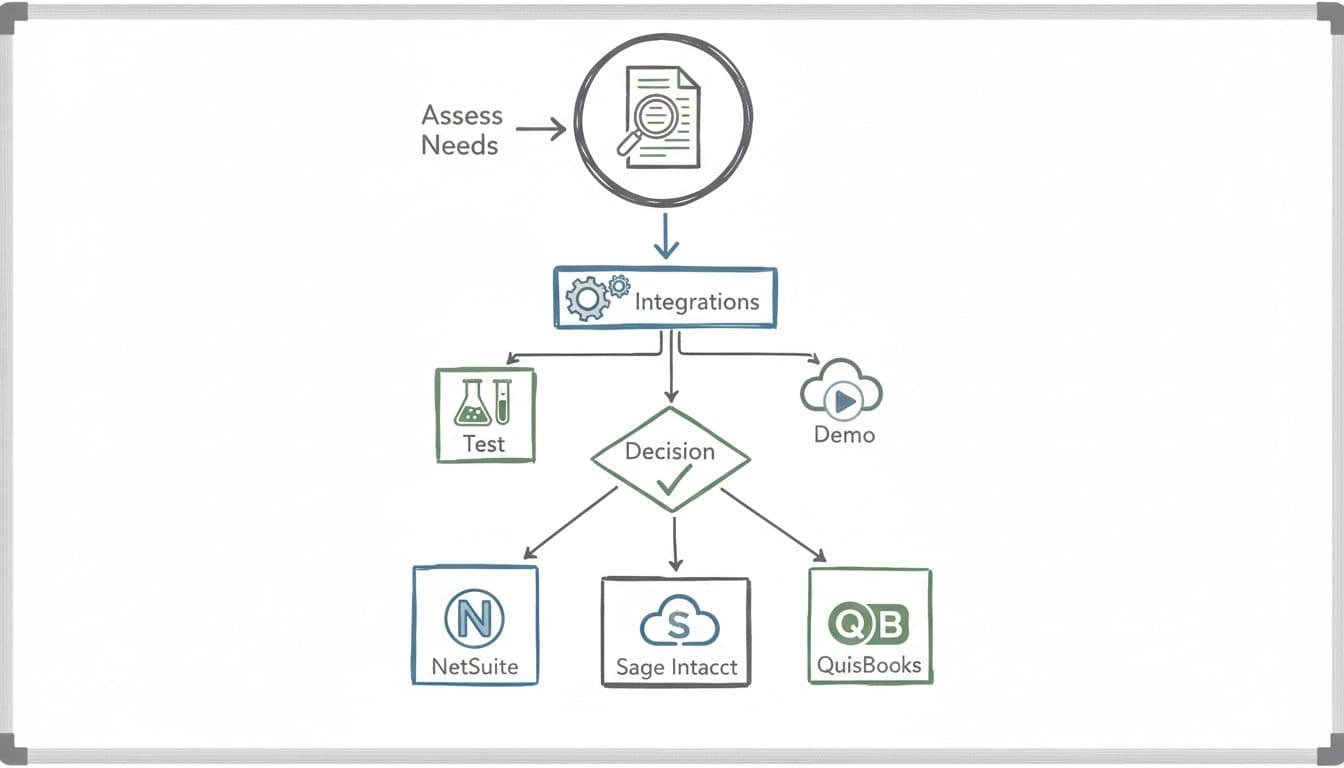
- Map the actual flow of money and data. Start with CRM, billing, cash, revenue recognition, close, and board reporting. Write down where each step happens now.
- Define non-negotiables. For SaaS teams, that usually includes ASC 606 or IFRS 15 support, deferred revenue workflows, multi-entity handling, approval controls, and usable reporting dimensions.
- Set a 24-month planning window. Include new entities, audit needs, pricing changes, geographic growth, and whether RevOps wants Salesforce or another CRM to stay system-of-record.
- Score systems on fit, not marketing. Use a weighted matrix with categories such as revenue recognition, integrations, close process, reporting, admin effort, and first-year total cost.
- Run a scripted demo. Use your own examples: annual prepaid contract, mid-term upsell, downgrade credit, entity consolidation, and board metrics pack. That exposes weak spots quickly.
- Talk through implementation, not only product. Ask who owns data migration, billing sync, approval design, and post-go-live admin work. This is where many projects slip.
- Decide what stays outside the accounting system. Cohort analysis, product usage reporting, and some ARR logic may live in BI or a warehouse. Make that explicit before signing.
This is also the right point to line up related internal resources on SaaS ERP implementation and the month-end close process, because system selection and rollout design should happen together.
Conclusion
The right choice comes down to operational fit. QuickBooks works when the business is still simple. Sage Intacct fits finance-heavy SaaS teams that need stronger controls and reporting without broad ERP scope. NetSuite fits companies ready to absorb more implementation effort in exchange for wider system coverage.
The expensive mistake is choosing by brand or demo polish. Choose the system that can carry your revenue model, your close process, and your next phase of growth without pushing core accounting back into spreadsheets.
